
What Snapchat Plus Planets and Features Reveal to Other People
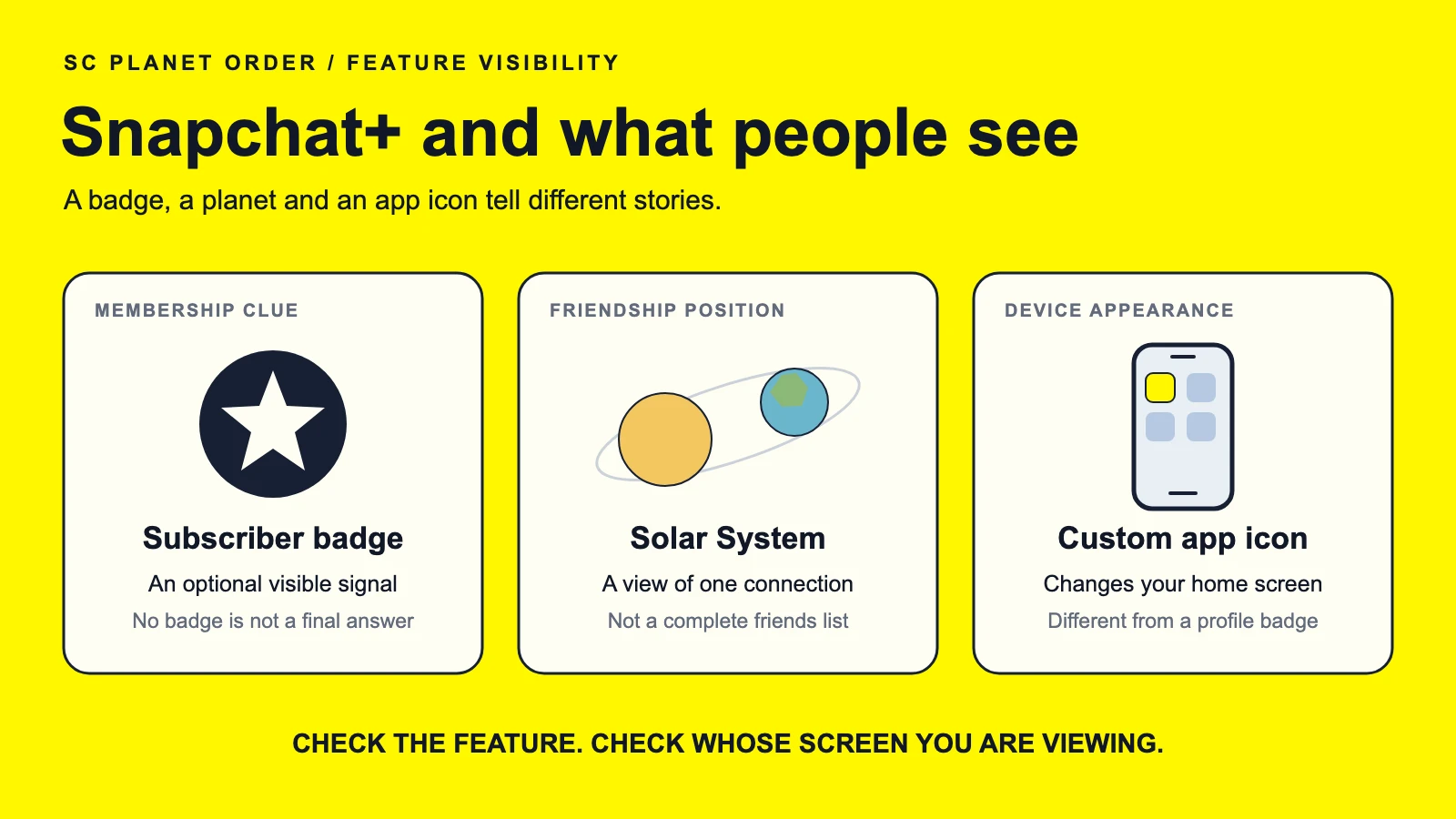
The Snapchat+ star is optional. Someone can have a subscription and leave it off, so an ordinary-looking display name does not settle the question. Planets cause a different kind of confusion: a person showing you a friendship position is not necessarily showing you evidence that both accounts have Snapchat+. These details tend to get lost when a screenshot travels from one chat to another. If you are trying to work out what a friend can see, it helps to start with the star, then look at the other features separately.
The subscriber star can be switched off
For an online account, “I can see it” and “you can see it” are separate questions. That applies to a social profile or a casino account at incaspin casino. On Snapchat, the optional subscriber star is a good example: access to the subscription and a decision to display it are two different things.
Snapchat’s instructions for the badge say it starts switched off. A subscriber can enable the black star from the Snapchat+ membership card; friends with an updated version of the app should then see it beside the display name. That is the most direct answer to how to tell if someone has Snapchat Plus. Look for the actual subscription label, rather than assuming every star-shaped symbol means the same thing.
The gold Snap Star label belongs to a separate creator category. It should not be confused with the subscriber badge. These are the four situations most relevant to this question, along with the conclusions each one supports.
| What is on screen | What it tells you | What remains unknown |
|---|---|---|
| Snapchat+ badge | The account displays subscriber status | Which options the person uses |
| No Snapchat+ badge | The label is not displayed there | Whether the account subscribes |
| Gold Snap Star label | The account has a creator label | Whether it also has Snapchat+ |
| Planet screenshot | A friendship position is shown | The subscription status of both accounts |
A planet screenshot needs some context
Imagine that Sam sends you a picture of Mars with the message “that’s you.” Before discussing the rank, ask which profile Sam had open. A screenshot can lose the one detail needed to interpret it. Was Sam looking at your Friendship Profile, or showing you an image from somewhere else? The planet name by itself cannot answer that.
Snapchat describes the Solar System view as showing your position in the other person’s list when you tap the Best Friends badge. First-time subscribers have to enable the feature. Seeing a planet through your own account therefore does not, by itself, establish that the person whose profile you opened also pays for Snapchat+.
There is another limit worth spelling out. The full Best Friends list is private, although people may see whether they belong among your Best Friends. A position does not reveal the names above or below it. Our planet memory map helps identify the eight names, but learning the sequence will not fill in those missing people.
Knowing your place in a list does not tell you who occupies the other places.
An app icon and a profile badge appear in different places
Some Snapchat Plus features change your own view of the app. The custom app icon, for example, changes Snapchat’s icon on your phone’s home screen. A friend sitting beside you might notice it there. A friend opening your Snapchat profile is looking somewhere else. That difference gets overlooked when every customization is described loosely as a way to spot a subscriber.
| Feature | Where you encounter it | What it shows |
|---|---|---|
| Subscriber badge | Beside a display name | A membership label |
| Solar System | Within a Friendship Profile view | Your position in that person’s list |
| Custom app icon | On the phone’s home screen | A chosen app appearance |
| Story Rewatch Indicator | In your posted Story details | How many friends rewatched |
The Rewatch Indicator is another case where the wording matters. It counts friends who rewatched a Story, not every replay, and it does not identify those friends. Seeing a number is different from being given names. Before drawing a conclusion from an unfamiliar screen, there are a few details you can establish without guessing.
- Find out whose account opened the screen.
- Identify the feature by its name.
- Keep the surrounding labels in view.
- Separate counts from information about named people.
- Compare the screen with that feature’s official help page.
Hiding the badge has limits
Can other people see if you have Snapchat Plus when the star is off? Switching it off removes that particular signal. It does not guarantee that every subscriber-only option will be unnoticeable. Snapchat’s account-label guidance says that some exclusive features can also surface subscription status. The badge setting is therefore a place to start, rather than a promise about everything another person might encounter.
Best Friends Forever illustrates why broad privacy claims need care. An individual number one BFF pin is private. But when two subscribers pin each other, both can see a special emoji. The mutual version has a different result from a pin made by one person. For your own account, a short review can help you find the settings you meant to enable.
- Open the Snapchat+ membership card.
- Check whether the subscriber badge is enabled.
- Look over the options you have actually turned on.
- Read the help entry for any feature you are unsure about.
- Review screenshots before sending them to another chat.
Screenshots deserve that last check because they can contain more than the feature you wanted to discuss: a username, a conversation preview, or a name above the badge. Cropping those details can make an example easier to share. It will not change the app’s settings, of course. It only changes what is visible in that particular image.
A hidden badge and a carefully cropped screenshot solve different problems.
Comparing settings with a friend
If you and a friend are discussing planets on Snapchat Plus, compare the named feature rather than trying to infer an entire subscription from a picture. “Do you have Solar System turned on?” is a more specific question than “Why does yours look different?” Your friend can answer without sending a complete profile screenshot or explaining every other setting on their account.
You can identify a displayed subscriber badge with confidence. Without it, some questions may stay unanswered unless the person tells you. Planet positions, replay counts, and custom icons each have their own purpose and limits. Keep those distinctions in mind when comparing screens, and avoid reading an absent label as a definitive no. Sometimes the simplest explanation is that two people made different choices about which options to turn on.

Amber Burnett
Amber Burnett, M.A., is a communication expert and educator with over 15 years of experience driving social media growth. She is sharing snapchat growth at scplanetorder.com. Specialising in effective communication, collaboration, and STEM education, she has a proven track record of building successful businesses across the globe. She is serving as lecturer at school of professional communication at Texas Tech University.