
Know Snapchat Planets Order, Meaning & List
Snapchat Planets Order is a fun way to see where your friends stand in your Snapchat Solar System, but it also reflects your engagement and activity on the app. The more you interact with others, the stronger your connections become.
This planet order is an exciting way to see who I interact with the most, using planets to represent different friendship levels. The closer a friend’s planet is to my Sun, the stronger our connection on Snapchat.
If I chat with someone daily, they’ll be Mercury, my #1 best friend. But if our interactions are rare, they might be Neptune, the farthest planet. This feature makes friendships more visual and interactive, and I’ll explain exactly how it works, how to check your planet ranking, and how to improve it! Let’s dive in!
What is the Snapchat Planets Order?
The Snapchat Planet Order is an exciting feature introduced to Snapchat Plus users that allows you to visualize your friendships through a solar system analogy. In this feature, you are the Sun, and your friends are represented as planets that orbit you based on your level of interaction with them.
The closer the planet is to your Sun, the more frequently you interact with that friend on Snapchat. Friends you communicate with daily will appear closer to your Sun, while those you engage with less often will be farther out in the system.
This visual representation adds a fun and interactive twist to your friendships on Snapchat, encouraging more frequent communication and engagement.

Snapchat Planets Order, Meanings & Positions
| Planets | Position | Meaning |
|---|---|---|
| Sun (You) | Center | You are the Sun, and your friends orbit around you. |
| Mercury | 1st (Closest) | Your #1 Best Friend—the person you interact with the most. |
| Venus | 2nd | A very close friend—frequent Snaps and chats. |
| Earth | 3rd | A strong friendship, but slightly less interaction than Mercury & Venus. |
| Mars | 4th | A good friend, but chats are less frequent. |
| Jupiter | 5th | A casual friend—you interact occasionally. |
| Saturn | 6th | An occasional friend—rare Snaps and chats. |
| Uranus | 7th | An acquaintance—minimal interaction. |
| Neptune | 8th (Farthest) | A distant friend—barely any communication. |
The Snapchat planets are named after the planets in our solar system, and each represents a different level of closeness in your friendship. Here’s a breakdown of the Snapchat planets and what each one means:
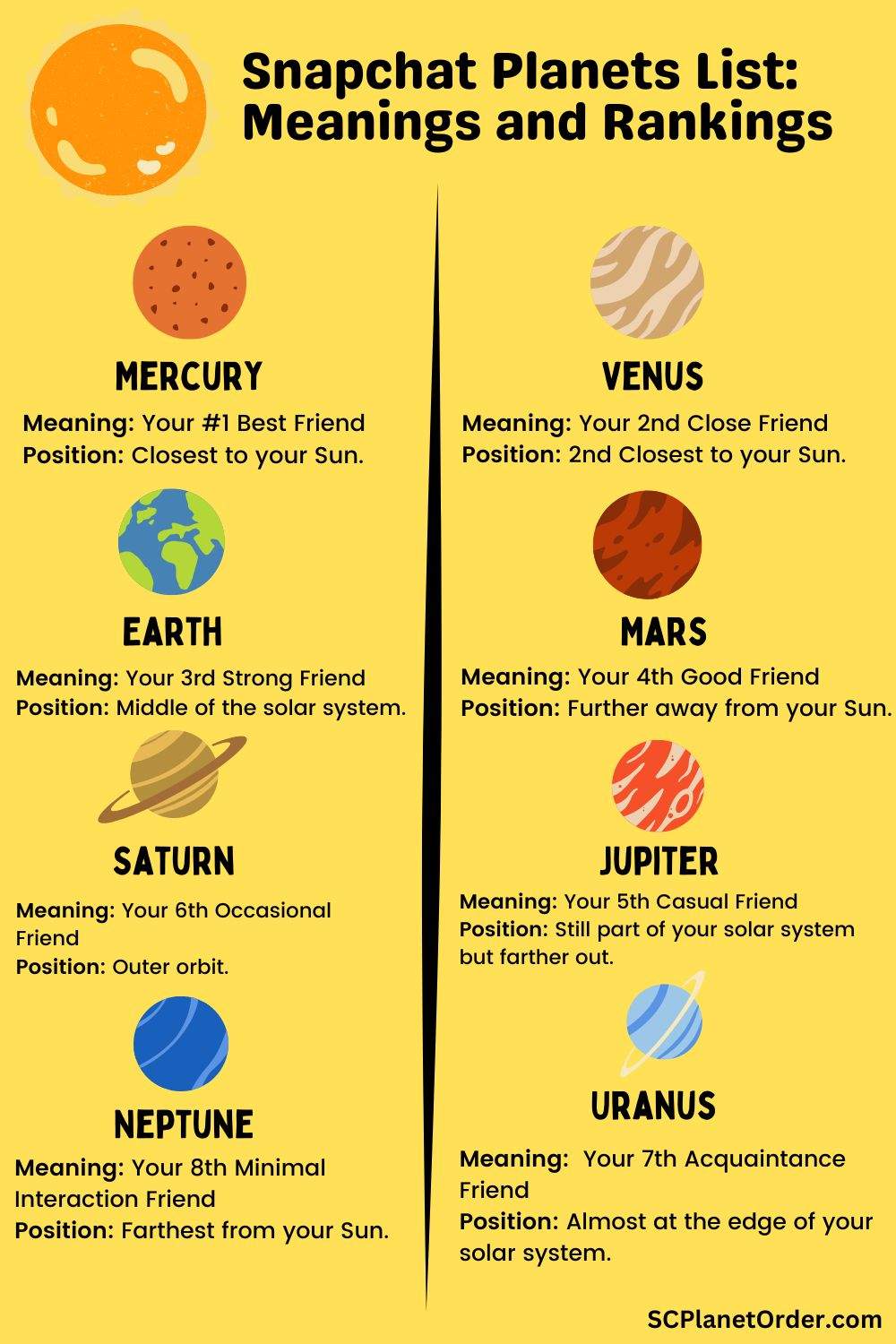
1. Mercury – Your #1 Best Friend
- Position: Mercury is the closest to your Sun.
- Meaning: The person you interact with the most. This is your best friend on Snapchat, and you likely engage with them daily. They are the closest orbiting planet to you, signifying strong, consistent interactions.

2. Venus – Your 2nd Close Friend
- Position: Venus is the second closest to your Sun.
- Meaning: This friend is one you talk to regularly but not as frequently as your Mercury. Still, this friendship is solid and engaging, and you’ll likely share many moments with them.

3. Earth – Your 3rd Strong Friend
- Position: Earth is in the middle of the solar system.
- Meaning: A great friend, but you interact slightly less often than with your Mercury and Venus. Earth is symbolic of a reliable but slightly more distant friendship.

4. Mars – Your 4th Good Friend
- Position: Mars planet is behind Earth in 4th poition.
- Meaning: You still interact with this friend a few times per week, but they don’t rank as highly as the first three. Mars is for good friends who you may not chat with as consistently.

5. Jupiter – Your 5th Casual Friend
- Position: Jupiter is in 5th position just behind the Mars and before Saturn.
- Meaning: Interactions are less frequent. You may only talk once a week or even less. This friend is still important, but the relationship is more casual.

6. Saturn – Your 6th Occasional Friend
- Position: Saturn is in the Outer orbit.
- Meaning: Conversations with this friend are sporadic, and your relationship may have transitioned offline. You don’t interact often, making them one of the more distant planets in your solar system.

7. Uranus – Your 7th Acquaintance Friend
- Position: Uranus is almost at the edge of your solar system.
- Meaning: Communication with this person is minimal. You might only interact occasionally or through Stories rather than direct conversations.

8. Neptune – Your 8th Minimal Interaction Friend
- Position: Farthest from your Sun.
- Meaning: The Neptune planet represents your most distant friends. You barely communicate with them, and interactions are rare, if any. This person is the most detached from your social orbit.

How Does the Snapchat Planet Order Work?
Snapchat’s Friend Solar System shows your place in a friend’s Best Friends list using planets. Each planet stands for a different rank. Here’s how Solar System at Snapchat works:
Available to Snapchat+ Subscribers Only
- The Friend Solar System feature is exclusive to Snapchat+ users.
Best Friends Badge
- You’ll see a gold-ringed ‘Best Friends’ badge on a friend’s Friendship Profile.
- This badge indicates that the person is among the top eight friends you interact with most via Snaps and Chats.
Tap to See Your Planet
- Tapping the badge reveals your position in their Friend Solar System.
- Each planet represents a different rank in their Best Friends list—the closer the planet to the “sun,” the higher your ranking.
Feature Is Off by Default
- First-time Snapchat+ subscribers will find this feature disabled by default.
- You can enable or disable the Solar System anytime by going to the Snapchat+ feature management page.
How to Subscribe to Snapchat Plus?
Want to unlock extra features on Snapchat? Follow these easy steps to get started with Snapchat+:
- Download and Open the Snapchat App: First, install Snapchat from the App Store (iOS) or Google Play Store (Android). Launch the app once it’s installed.
- Create Your Snapchat Account: Sign up for a new account and personalize your profile based on your interests.
- Access the Settings Menu: Tap on your Bitmoji or profile icon in the top-left corner, then hit the gear-shaped Settings icon in the top-right corner.
- Find the Snapchat+ Option: Scroll through the settings list until you find Snapchat+ and tap on it.
Choose How You Want to Join: You’ll see two choices:
- Subscribe
- Snapchat+ Gift
Tap on Subscribe to move forward.
- Explore Snapchat+ Features: Scroll down to view a list of premium features available with Snapchat+.
- Proceed to Subscription Plans: Tap the Next button to view available subscription options.
- Select a Plan: Choose between a Monthly or Yearly subscription based on your preference.
Once you confirm your selection, you’ll have access to exclusive Snapchat+ features and customizations.
Snapchat+ Subscription Cost: U.S. vs. U.K.
Snapchat+ is available in multiple regions with varying pricing plans. Whether you’re in the United States or the United Kingdom, you can choose between monthly or yearly subscriptions. Here’s a simple breakdown of the current Snapchat+ pricing in both countries:
| Country | Monthly Plan | Six Month | Yearly Plan |
| United States | $3.33 | $21.99 | $39.99 |
| United Kingdom | £4.49 | £21.99 | £39.99 |
What are the Features of Snapchat+?
Snapchat+ offers a collection of exclusive features that make your app experience more personalized, powerful, and fun. From custom icons to advanced story insights and early feature access, Snapchat+ gives you more ways to connect and stand out.
- Custom App Icons & Themes: With Snapchat+, you can personalize your app by choosing from a wide variety of custom app icons and themes. It’s a fun way to give your Snapchat interface a fresh look that matches your mood or style.
- Friend Solar System: The Friend Solar System shows a fun, visual ranking of your top friends. It’s a unique way to see who’s closest to you based on your interaction levels.
- Story Rewatch Indicator: With the Story Rewatch Indicator, you’ll know how many times your friends have viewed your stories. This gives you more insight into who’s really paying attention to your content.
- Best Friends Forever: The Best Friends Forever feature lets you pin one person as your #1 best friend at the top of your chat list. This ensures quick access to your favorite person every time you open the app.
- Snapchat+ Badge: Your Snapchat+ badge appears on your profile to let others know you’re a premium subscriber. It’s a subtle flex that shows you’re ahead of the curve.
- Gift Snapchat+: Want to share the experience? Snapchat+ allows you to gift the subscription to friends and family.
How to Use the Best Friends Badge in Snapchat+?
Snapchat+ lets you see how close you are to your friends with a fun “Best Friends” badge. Each badge represents a planet, showing your friendship rank in a playful, space-themed way.
- Subscribe to Snapchat Plus (details below).
- Visit your Profile to see the “Best Friends” badge on your closest friends’ profiles.
- Long press the badge to see the planet assigned to each friend.
How to Enable/Disable Snapchat Solar System?
The Snapchat Solar System feature lets you see your closest friends as planets. You can enable or disable it anytime based on your preference. Below are the simple steps to enable or disable this feature.
Enabling Snapchat Solar System:
- Open Snapchat and go to your profile.
- Tap the Snapchat Plus banner.
- Toggle on the Solar System button to activate the feature and begin seeing your planet placements.
Disabling Snapchat Solar System:
- Go to your profile and tap the Snapchat Plus settings.
- Toggle off the Solar System button to disable the feature.
How to Check Your Position in a Friend’s Solar System?
To see your Snapchat Planets Order, follow these steps:
- Confirm that you’re a Snapchat Plus subscriber.
- Visit your friends’ profiles. Look for the Best Friends badge.
- Long press on the badge to reveal the planet that represents their position in your solar system.
This will give you a dynamic view of how your interactions are ranking, and which friends are in your inner circle.
Can I See Someone else’s Snapchat Planet Order, or Is It Private?
No, you cannot see someone else’s Snapchat Planet Order. This feature is private and only visible to the Snapchat Plus user who owns the account.
Here’s why:
- Your Planet Order is based on your personal interactions with friends, meaning only you can see who ranks where.
- Snapchat does not share your friendship rankings publicly to protect user privacy.
- Even if you and a friend both have Snapchat Plus, you can’t see each other’s planets—only your own.
However, if someone shares a screenshot of their Best Friends Solar System with you, that’s the only way to know your placement in their order!
How to Improve Your Planet Position?
Want to boost a friend’s planet placement or move up the ranks yourself? Here are some strategies to improve your Snapchat Solar System position:
Tips to Improve Your Planet Ranking:
- Maintain long Snap streaks (over 100+ days).
- Engage with your friend daily by starting conversations, replying quickly, and sharing Snaps.
- Send personal Snaps rather than just quick chats.
- Comment on their Stories regularly to show you’re interested in their content.
- Use fun emojis to show your investment in the friendship.
By consistently interacting, you can improve the rank of your friends in your solar system and even boost your own planet placement.
Can You Manually Change Your Snapchat Planet Order?
No, you cannot manually change your Snapchat Planet Order because it is automatically determined by Snapchat’s algorithm based on your interactions.
The order is influenced by:
- How often you chat with a friend.
- How many snaps you send and receive.
- Story interactions, such as comments and reactions.
- Call frequency (video or voice calls).
Since the ranking is based on engagement, the only way to change the Planet Order is by interacting more with the friend you want to move closer in the order. Over time, Snapchat will update the positions based on your activity.
How Often Does the Snapchat Planet Order update?
The Snapchat Planet Order updates regularly and dynamically based on your interactions with friends. However, Snapchat has not revealed an exact timeframe for updates.
Here’s how it works:
- Frequent interactions (chats, snaps, story replies, video calls, etc.) can quickly shift planet rankings.
- If you stop engaging with someone, their planet placement will move further away.
- New best friends can replace old ones, meaning the order isn’t permanent.
Typically, changes happen within a few days if your interaction levels shift significantly. Keeping up regular communication is key to maintaining a high position in someone’s Snapchat Solar System!
Why Was Snapchat Planet Order Created?
The Snapchat Planet Order feature was created to add a gamified element to your social interactions on the app. By making your friendships more visual and dynamic, it encourages users to engage more frequently with their friends, fostering deeper and more consistent connections.
Additionally, it provides a clear incentive for users to subscribe to Snapchat Plus, adding more value to the paid subscription and encouraging regular use of the app.
Is Snapchat good for Younger Users?
According to healthyyoungminds.com, Snapchat can be fun and creative for younger users, but it comes with significant risks. Features like disappearing messages, Snap Map, and filters may encourage unsafe behavior, oversharing, or exposure to inappropriate content.
While it promotes self-expression, it can also lead to issues like cyberbullying, screen addiction, and privacy concerns. With proper parental controls, open communication, and awareness, it can be used more safely—but overall, Snapchat is not ideal for young users without close supervision and guidance.
Pros and Cons of Snapchat Plus
Here’s a quick comparison of the pros and cons of Snapchat+ to help you decide if it’s right for you:
| Pros | Cons |
| Unlocks exclusive features not available in the standard app. | Requires a paid subscription, which may not suit all users. |
| Offers enhanced customization for icons, wallpapers, and Bitmoji. | May encourage social comparison due to friend ranking tools. |
| Lets you boost private stories for higher visibility. | Certain features raise concerns about user location privacy. |
| Provides friend insights through features like the Solar System. | Over-reliance on premium features can reduce app enjoyment without them. |
| Includes one free Snapstreak recovery every month. | Early access to experimental features may feel intrusive or buggy. |
| Grants early access to upcoming features before public release. | Casual users may not benefit enough to justify the cost. |
| Displays a special badge that can serve as a social status symbol. | Some users report added drama or tension in relationships. |
| Offers a 7-day free trial to test premium tools risk-free. | Not all features are essential for an average Snapchat experience. |
Choose Your Ideal Growth Service
Find the perfect package to fit your Snapchat goals and enjoy maximum results at competitive prices. Get instant visibility and engagement with Scplanetorder.com/snapchat
FAQs
Q. What Is the Snapchat Solar System?
The Snapchat Solar System is a feature available to Snapchat Plus users, where your closest friends are represented as planets orbiting around you, showing the strength of your interactions with them.
Q. How many best friend planets are on Snapchat?
There are 8 planets in total, representing the 8 closest friends in your social network.
Q. How do you make someone your #1 best friend fast?
To boost a friend’s rank, engage with them daily by starting conversations, keeping your Snap streaks strong, and regularly replying to Snaps. This will help improve their rank in your solar system.